Built on VisoMaster and VisoMaster Fusion
Face swap for photos and videos, on your computer.
One window: add media, pick a reference face, choose who to replace, adjust and export. Every advanced control from Fusion is still there when you need it.
Video examples
Before and after. Left: original clip. Right: the same clip with the face swapped.
All people shown are synthetic (AI-generated) adults.
- Fusion parameters, all kept
- 427
- Fusion parameters, all kept
- face swap models
- 10 + DFM
- face swap models
- face restorers
- 9
- face restorers
- frame enhancers and colorizers
- 12
- frame enhancers and colorizers
- face detectors
- 4
- face detectors
- model checks passed on Mac
- 67 / 67
- model checks passed on Mac
Model check: every model downloaded, loaded and produced an image in one automated run on an Apple Silicon Mac (2026-10-11).
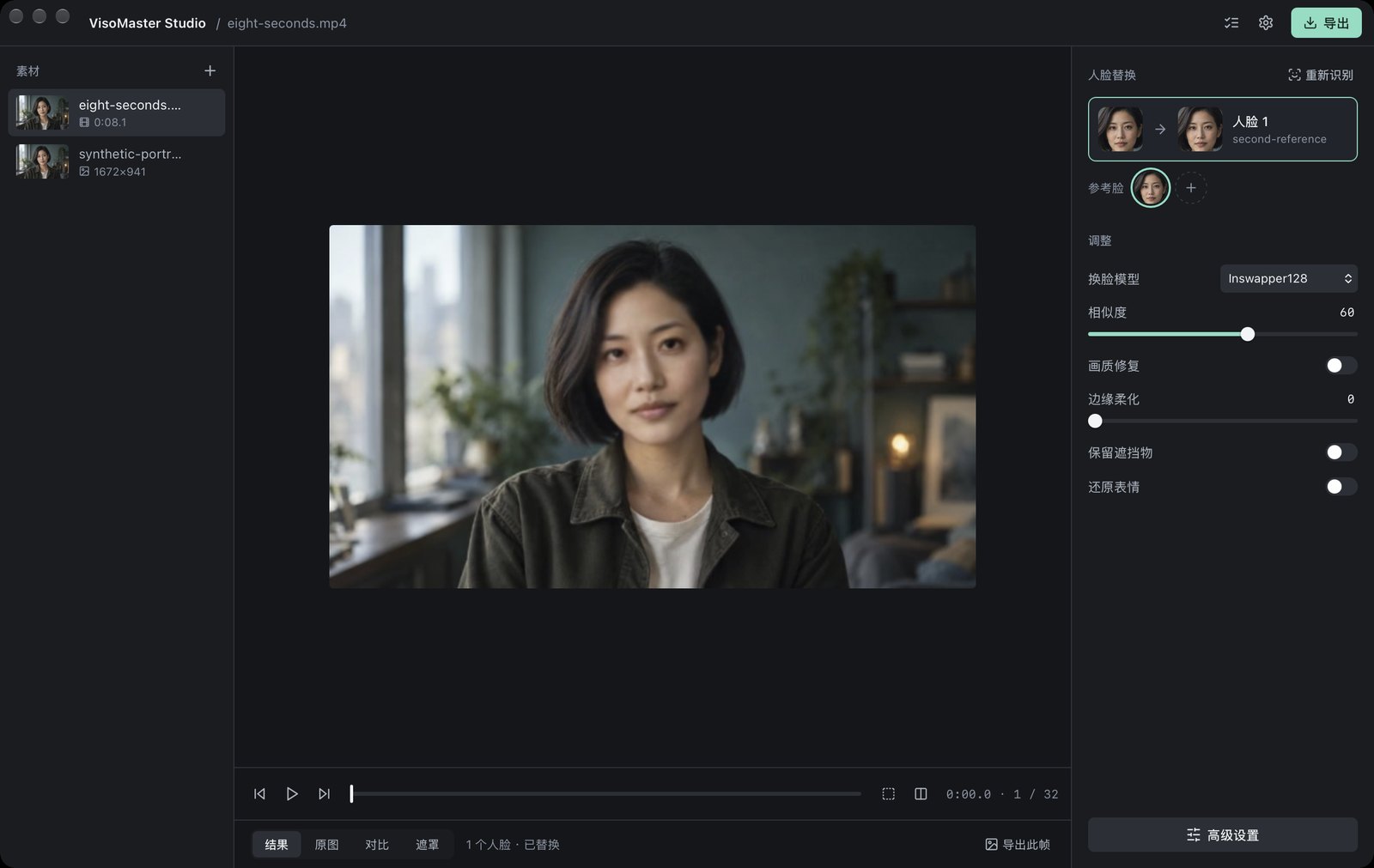
Simple to start. Nothing taken away.
Ready to install
The runtime and FFmpeg are included. No Python, Conda or Git setup. Models download once from their official sources, with resume and SHA-256 checks.
One clear workspace
Media, preview and face mapping in one window, with six everyday adjustments. All 427 Fusion parameters are in Advanced settings, grouped and searchable.
Images, video and live camera
Export images, whole videos, ranges or several segments, keep the audio, batch all media, set parameter markers, scan for frames where a face is lost, or swap live from a camera.
Projects and presets
Save and reopen projects in the VisoMaster Fusion workspace format, keep presets, and manage merged reference faces in a face library.
Processed on your computer
Your images and videos stay on your computer. The app does not need an online account to work.
Open source
The desktop source is GPL-3.0, like VisoMaster and Fusion. The paid download is the signed, ready-to-run package.
The models from VisoMaster Fusion
Pick a model per face. Models download from their official sources the first time a feature needs them.
Face swap
- Inswapper128 (128–512)
- SimSwap512
- GhostFace v1 / v2 / v3
- CSCS
- AlphaFace
- InStyleSwapper256 A / B / C
- DeepFaceLive DFM models
Face restoration
- GFPGAN v1.4 and 1024
- CodeFormer
- GPEN 256 / 512 / 1024 / 2048
- RestoreFormer++
- VQFR v2
Masks, expression and frame
- Occlusion, XSeg, face parser, CLIP text masks
- LivePortrait expression restore
- Face editor, makeup, re-aging
- Real-ESRGAN, BSRGAN, UltraSharp upscaling
- DDColor and DeOldify colorization
Five steps from media to result.
- 01
Add media
Drop in an image or a video.
- 02
Add a reference face
Choose the face you want to use.
- 03
Choose who to replace
Faces are detected; map each one you want to change.
- 04
Preview and adjust
Compare with the original and fine-tune.
- 05
Export
Save the image or video with its audio.
Mac and Windows
One purchase includes every installer. Runtime and FFmpeg are bundled.
Guides
All guidesDeepFaceLive DFM Models: What They Are and How to Use Them
What a DeepFaceLive .dfm model is, how DeepFaceLab and DeepFaceLive differ, and how to import and use .dfm files in VisoMaster Studio on Mac or Windows.
Face Swap Models Compared: Inswapper, SimSwap, Ghost
Inswapper, SimSwap, GhostFace, CSCS, AlphaFace and InStyleSwapper compared: input size, recognition model, license and options in VisoMaster Studio.
GFPGAN vs CodeFormer vs GPEN: Face Restorers Compared
GFPGAN, CodeFormer, GPEN, RestoreFormer++ and VQFR compared: who made them, input sizes, fidelity controls, licenses and settings in VisoMaster Studio.
How to Face Swap a Video Locally on Mac or Windows
Face swap a video on your own computer with VisoMaster Studio: add a reference photo, map it to a face, check masks and restoration, then export.
How to Swap Multiple Faces in a Video, Step by Step
Swap several faces in one video with VisoMaster Studio: map a reference to each person, give each face its own settings and leave the others alone.
What Is VisoMaster Fusion? VisoMaster, Fusion and Studio
VisoMaster Fusion explained: how it grew from the original VisoMaster, what it adds, and how VisoMaster Studio packages it for Mac and Windows.
Questions
What do I need?
A Mac with macOS 14 or later (Apple Silicon or Intel), or Windows 10/11 64-bit. The Windows and Intel Mac builds are previews.
How do I buy it?
The signed installer is $19.99 through Patreon. The source code is GPL-3.0 and free.
Are models included?
No. The app downloads the base models (about 469 MB) on first launch and other models only when a feature needs them. Each model keeps its own license.
Is my media uploaded?
No. Processing happens on your computer.
How is it different from VisoMaster Fusion?
Studio runs the same Fusion processing (all 427 parameters and the same models) in a new single-window desktop app, and ships as an installer with the runtime and FFmpeg included. Fusion itself is installed from its GitHub source with its own setup scripts.
Which face swap models are included?
Inswapper128, SimSwap512, GhostFace v1–v3, CSCS, AlphaFace, InStyleSwapper256 A–C and your own DeepFaceLive .dfm models, plus GFPGAN, CodeFormer, GPEN, RestoreFormer++ and VQFR face restorers.
Can it swap several people in one video?
Yes. Each detected face can be mapped to its own reference face with its own settings; faces you do not map are left unchanged.
What language is the app in?
The app interface is currently in Chinese. This website and the guides are in English and Chinese.
Can I use it on anyone?
Only on yourself or on people who have given explicit consent. See the acceptable use policy.
Get VisoMaster Studio
Installers for Mac and Windows · $19.99 via Patreon.
Download