Face Swap Models Compared: Inswapper, SimSwap, Ghost
Inswapper, SimSwap, GhostFace, CSCS, AlphaFace and InStyleSwapper compared: input size, recognition model, license and options in VisoMaster Studio.
VisoMaster Studio offers ten one-shot swap models plus DeepFaceLive .dfm models. The differences you can check are concrete: the face size each model works at, the face-recognition model it needs, the options Studio adds on top, and the license the model's authors chose. Which one looks best depends on your footage, so this guide sticks to those facts and shows you how to compare the models on your own clip.
What a swap model changes
A one-shot swapper takes an identity embedding from your reference photo and redraws the inner face of the target with it. Head pose, lighting, hair and head shape come from the target, so changing the swap model does not change hair. Masks, face restoration and the final blend are separate steps that run after the swap.
Each model reads identity through its own recognition network. In Studio, Inswapper128, AlphaFace, the InStyleSwapper256 versions and DFM use the Inswapper ArcFace model; SimSwap512 uses the SimSwap ArcFace model; GhostFace v1 to v3 use the Ghost ArcFace model; and CSCS uses the CSCS ArcFace model plus an identity adapter. When you switch models, Studio computes the matching embedding for you, and the extra recognition model downloads the first time it is needed.
The models at a glance
| Model in Studio | Face size the model runs at | Recognition model | Origin | License stated by the authors |
|---|---|---|---|---|
| Inswapper128 (default) | 128 × 128; 256, 384, 512 or Auto by tiling | Inswapper ArcFace | InsightFace | Inswapper models: contact InsightFace for licensing; InsightFace models are for non-commercial research |
| AlphaFace | 256 × 256; 512 or Auto by tiling | Inswapper ArcFace | Yu et al., arXiv 2601.16429 (2026) | Repository: MIT |
| InStyleSwapper256 A, B, C | 256 × 256; optional 512 | Inswapper ArcFace | Not documented upstream | Unknown |
| SimSwap512 | 512 × 512 | SimSwap ArcFace | Chen et al., ACM Multimedia 2020 | CC BY-NC 4.0, academic and non-commercial use only |
| GhostFace v1, v2, v3 | 256 × 256 | Ghost ArcFace | Groshev et al., IEEE Access 2022 | Repository: Apache-2.0 |
| CSCS | 256 × 256 | CSCS ArcFace plus ID adapter | Huang et al., ACM TOG 2024 | Academic research, non-commercial only |
| DeepFaceLive (DFM) | Set by each .dfm file | Not used for identity | DeepFaceLive (GPL-3.0) | Depends on who trained the file |
Every model in this table produced an output in an automated test run of Studio 0.3.0 on an Apple Silicon Mac. That run checked that each model works; it did not measure speed or rank quality. Each model keeps its own license, and Studio's GPL-3.0 source license does not change it, so read the license before using a model for paid work.
Inswapper128
Inswapper comes from the InsightFace project. Its example README states that input and output are 128 × 128, and that it only accepts embeddings from the ArcFace model in InsightFace's buffalo_l pack, otherwise results are "not normal". Studio's Inswapper ArcFace file, w600k_r50, is the ResNet50 WebFace600K recognition model that InsightFace lists for the buffalo_l pack. The README also says the model is no longer maintained and points to InsightFace's commercial product for higher resolution.
Studio exposes a resolution setting for Inswapper with 128, 256, 384, 512 and Auto. Above 128, the model itself still runs at 128: Studio splits the aligned face into interleaved pixel grids and runs Inswapper once per grid (4 passes at 256, 9 at 384, 16 at 512), then puts them back together. Auto picks the step from how large the face is in the frame. Higher steps mean more passes per face.
On licensing, InsightFace's README says its models are for non-commercial research purposes and asks you to contact InsightFace for licensing of the inswapper models.
SimSwap512
SimSwap is from Renwang Chen, Xuanhong Chen, Bingbing Ni and Yanhao Ge, published at ACM Multimedia 2020. The official repository describes it as a framework for arbitrary face swapping with a single trained model. The repository has training settings for 224 and 512 models and describes its 512 model as a beta trained on the VGGFace2-HQ dataset.
In Studio, SimSwap512 runs on a 512 × 512 aligned face in one pass and uses its own ArcFace model. There is no resolution setting for it. The repository is licensed CC BY-NC 4.0 and says it is for academic and non-commercial use only.
GhostFace v1, v2 and v3
GhostFace in Studio is GHOST (Generative High-fidelity One Shot Transfer) by Groshev et al., published in IEEE Access in 2022; the repository is now ai-forever/ghost, formerly sberbank-ai/sber-swap. The repository provides U-Net generators with 1, 2 or 3 AAD ResBlk blocks and calls the 2-block model the main one. Studio's GhostFace v1, v2 and v3 files match those 1-, 2- and 3-block versions. The training tips mention an eye detection loss, which is part of how the authors trained the model.
All three run at 256 × 256 with the Ghost ArcFace model. The repository is Apache-2.0, and its README asks users not to change faces without consent.
CSCS
CSCS is the model from "Identity-Preserving Face Swapping via Dual Surrogate Generative Models" by Huang et al., ACM Transactions on Graphics 2024. Studio runs it at 256 × 256 and builds its embedding from the CSCS ArcFace model plus an identity adapter. The README says CSCS is released only for academic research and may be used freely for non-commercial purposes.
AlphaFace and InStyleSwapper256
AlphaFace comes from the paper "AlphaFace: High Fidelity and Real-time Face Swapper Robust to Facial Pose" (Yu et al., 2026); the title states the authors' design goals. Studio downloads an ONNX export of the official demo checkpoint from a release in a VisoMaster Fusion fork. It runs at 256 × 256 and has its own resolution setting (256, 512 or Auto), where 512 uses the same pixel-grid tiling as Inswapper. It reads the Inswapper ArcFace embedding.
The three InStyleSwapper256 versions also run at 256 × 256 with the Inswapper ArcFace embedding, and each has an optional 512 setting. We could not find a paper or upstream repository for them, so we make no claims about how they were trained or how the versions differ.
DeepFaceLive DFM models
DFM models are different: each .dfm file is trained for one specific identity, so you import a file rather than a reference photo. Studio passes the model a 512 × 512 aligned face, and the model's own resolution comes from the file. DFM adds its own options for AMP morph factor and RCT colour transfer. See using DeepFaceLive DFM models.
Secondary swapper
Studio can run a second swapper after the first and blend the two results with a blend amount from 0 (all primary) to 100 (all secondary). The secondary model is limited to Inswapper128, AlphaFace and the three InStyleSwapper256 versions, because they share the Inswapper ArcFace embedding. SimSwap512, GhostFace and CSCS cannot be the secondary model. The setting is in Advanced settings.
How to compare models on your own footage
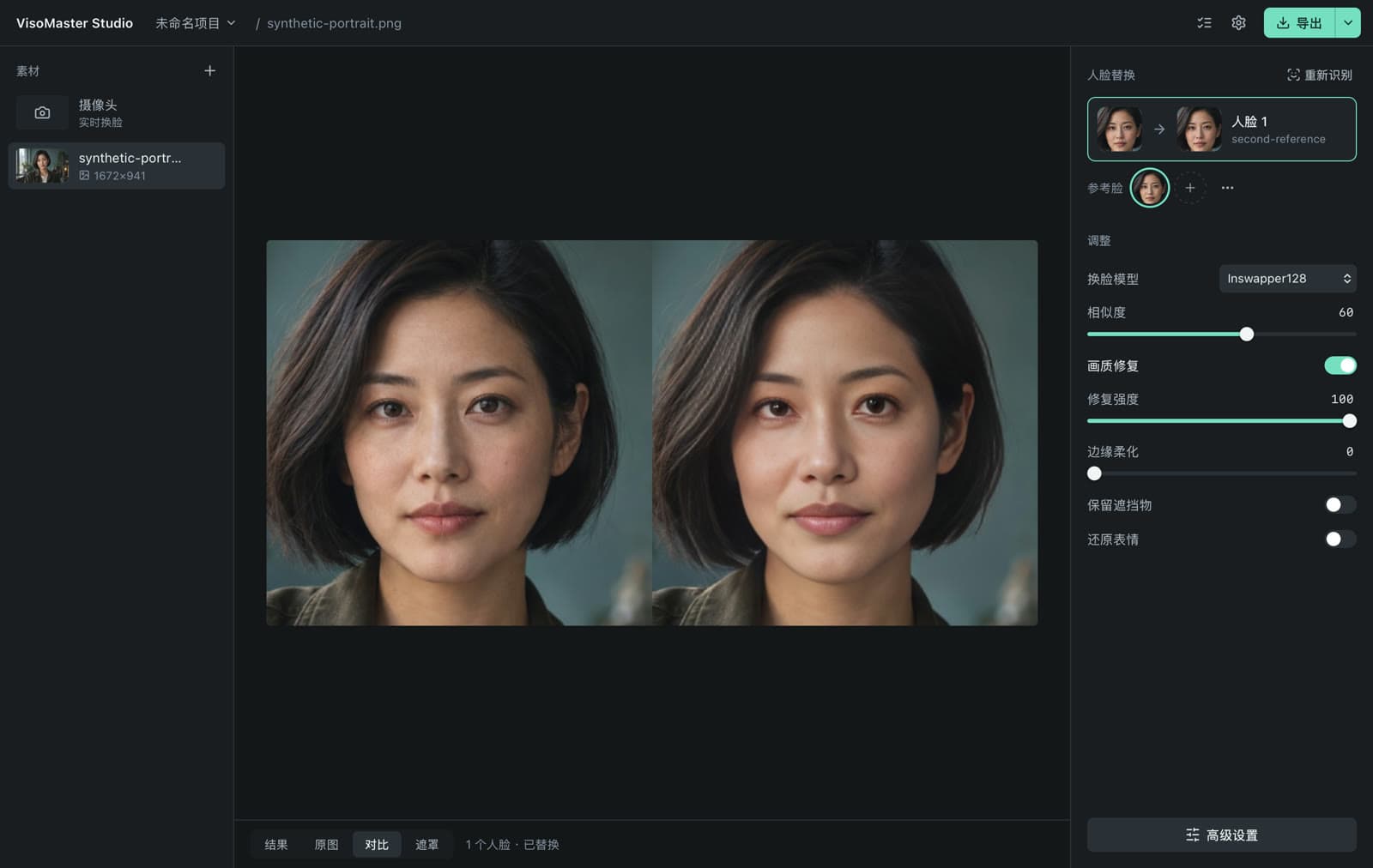
- Add your video or image and your reference photo, and map the reference to the target face.
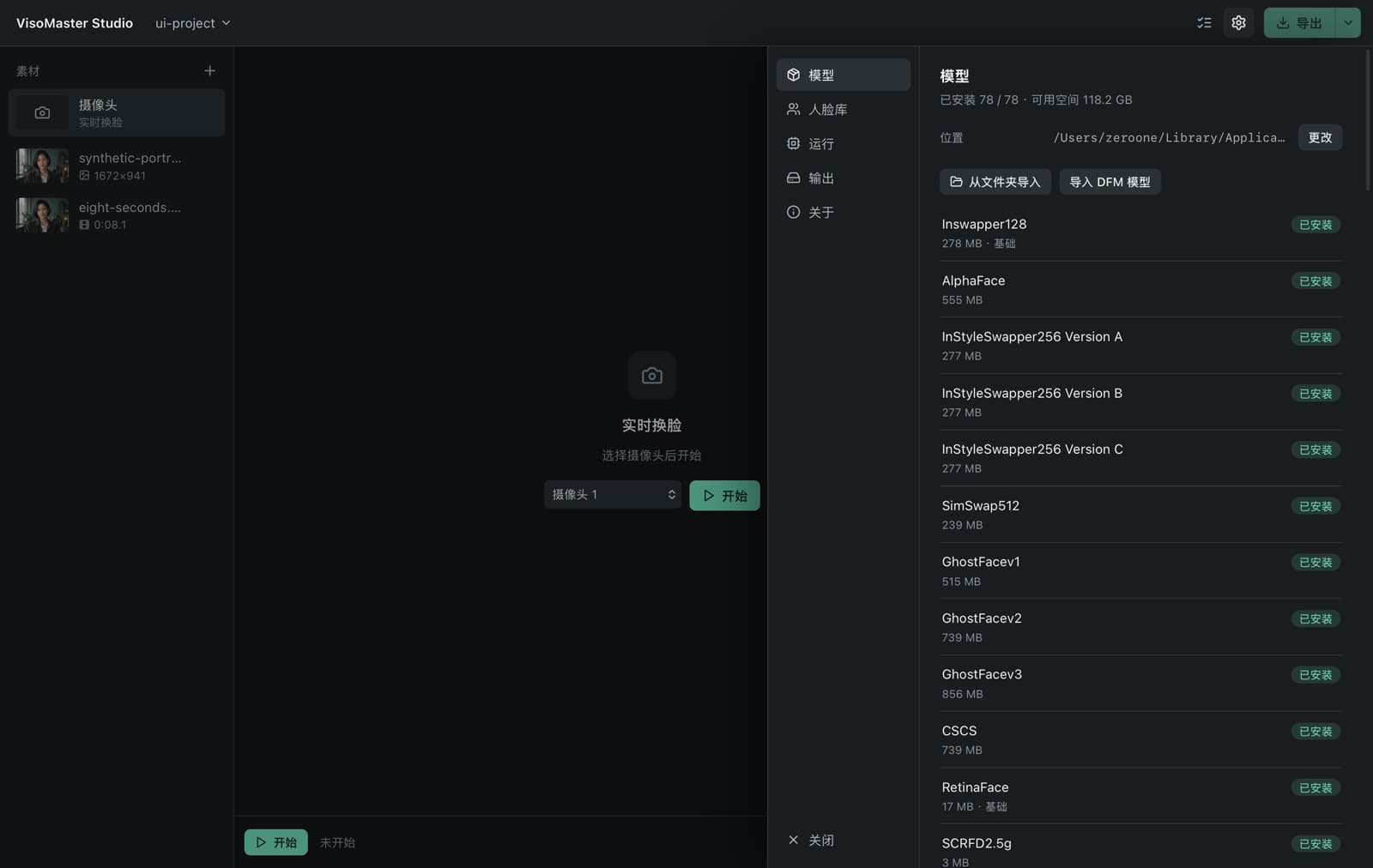
- Pick the swap model in the panel on the right. The model's resolution and the secondary swapper are in Advanced settings, which you can search.
- Move to a frame that matters, such as a profile view, a fast turn or a hand near the face.
- Switch to the compare view and look at the result next to the original. The first use of a model downloads it, plus its recognition model if needed.
- Repeat for each model, keeping the rest of your settings the same, and then decide whether face restoration helps. Restorers are compared in GFPGAN vs CodeFormer vs GPEN.
If you need different settings for part of a clip, parameter markers apply new settings from a chosen frame onward. With several people in one shot, each face has its own reference and settings; see how to swap multiple faces in a video. For how these models compare with FaceFusion's list, see VisoMaster vs FaceFusion.
Consent and acceptable use
Only use faces you have the right to use: your own, or someone who has given consent. Label synthetic media and follow local law. VisoMaster Studio's rules are in the acceptable use policy.
FAQ
Does Inswapper really output 512 pixels?
The model itself always runs at 128 × 128. At the 512 setting, Studio runs it 16 times on interleaved pixel grids of a 512 × 512 aligned face and puts the results back together. Compare the steps on your own footage to see whether the extra passes are worth it.
Can I use these models commercially?
It depends on the model, not on Studio. SimSwap (CC BY-NC 4.0) and CSCS are non-commercial, InsightFace says its models are for non-commercial research and asks you to contact it for inswapper licensing, the GHOST repository is Apache-2.0, and the AlphaFace repository is MIT. Check each license yourself before using a model in paid work.
Why can't I pick SimSwap or GhostFace as the secondary swapper?
The secondary swapper blends with the primary using the same identity embedding, so Studio limits it to models that use the Inswapper ArcFace model: Inswapper128, AlphaFace and InStyleSwapper256 A, B and C.
Does changing the swap model change hair or head shape?
No. Hair, head shape, pose and background come from the target. The swap model only redraws the inner face, and masks decide where its output is blended.
Get the installers at visomaster.studio/download.
Author

Categories
More Posts
DeepFaceLive DFM Models: What They Are and How to Use Them
What a DeepFaceLive .dfm model is, how DeepFaceLab and DeepFaceLive differ, and how to import and use .dfm files in VisoMaster Studio on Mac or Windows.

How to Swap Multiple Faces in a Video, Step by Step
Swap several faces in one video with VisoMaster Studio: map a reference to each person, give each face its own settings and leave the others alone.

GFPGAN vs CodeFormer vs GPEN: Face Restorers Compared
GFPGAN, CodeFormer, GPEN, RestoreFormer++ and VQFR compared: who made them, input sizes, fidelity controls, licenses and settings in VisoMaster Studio.